When the Fix Isn’t in the GPO: A Lesson in What You Don’t See
Sometimes, the most elusive issues in enterprise environments aren’t caused by what’s configured — but by what isn’t.
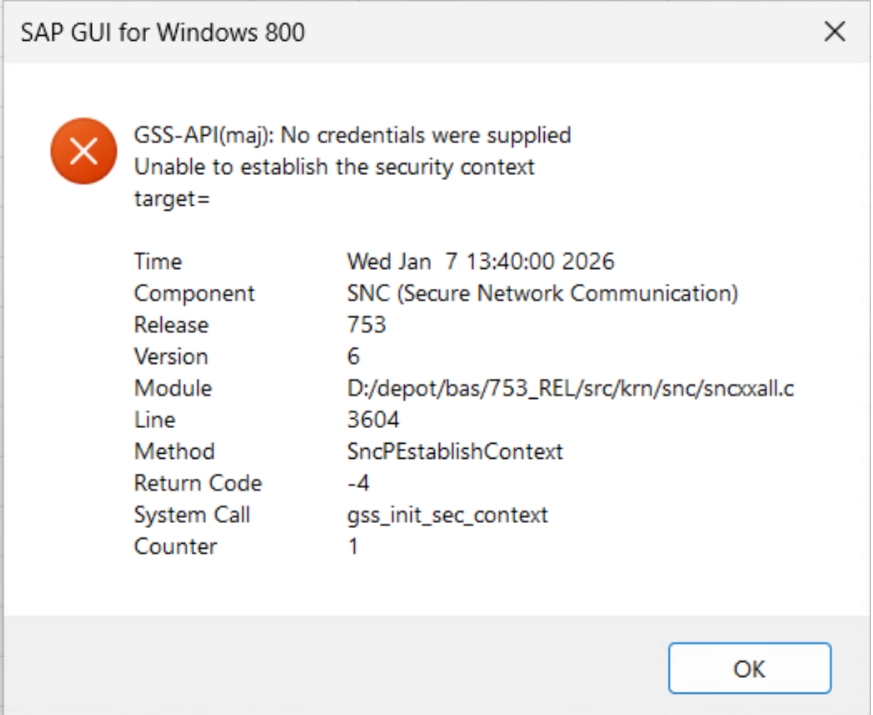
Recently, while deploying a CIS hardened Group Policy Object (GPO) to a fleet of Windows 11 virtual machines, we encountered a puzzling authentication failure. SAP Gui, a critical enterprise application relying on Kerberos-based Single Sign-On (SSO) began throwing cryptic GSS-API errors. Removing the GPO immediately resolved the issue, but reapplying it brought the problem back. The challenge was on.
The Methodology: Breaking It Down
Troubleshooting a complex GPO is like peeling an onion — layer by layer. Here’s how we approached it:
- Explode the GPO: We broke the monolithic GPO into smaller, testable chunks. This allowed us to isolate the impact of specific policy categories (e.g., Administrative Templates, Security Options, Registry Settings).
- Start with the obvious: We began by disabling known culprits — certificate padding checks, PKU2U authentication, Microsoft account restrictions — all to no avail.
- Then the less obvious: We reviewed every setting applied by the GPO, comparing it against known-good configurations. Still no luck.
- Finally, what’s missing?: That’s when it clicked. The issue wasn’t in what the GPO applied — it was in what it disabled.
The Usual Suspects: What We Looked at First
Before discovering the real cause, we naturally focused on the most common policy settings known to interfere with Kerberos authentication and SSO. These included:
- Certificate padding enforcement (EnableCertPaddingCheck)
- PKU2U authentication settings
- Credential delegation policies
- Microsoft account restrictions (e.g., blocking consumer account logins)
- TLS certificate pinning and trust chain enforcement
- Network security and firewall rules
Each of these was methodically tested and ruled out. While any of them could have been the root cause in a different scenario, none explained the behaviour we were seeing. This reinforced the importance of not just checking what’s present — but also what might be silently missing.
The Culprit: Local Group Policy Processing
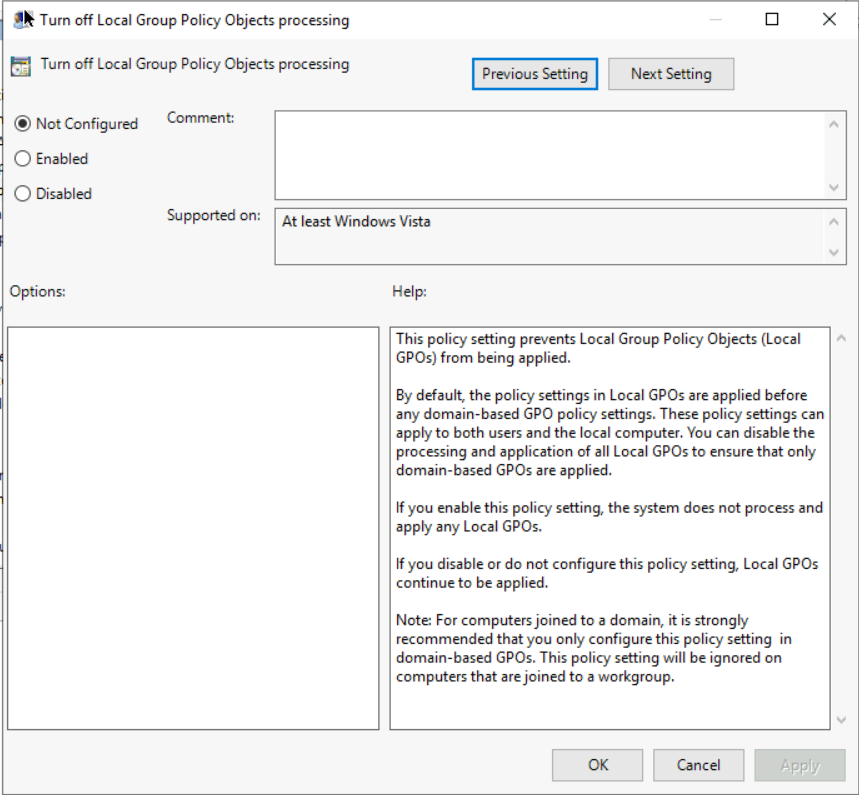
The breakthrough came when we realised that the domain GPO was explicitly disabling local Group Policy processing. This meant that any settings previously applied via Local Group Policy Objects (LGPO) were being ignored — including the very configuration that made SSO work in the first place.
In other words, the “working config” wasn’t in the domain GPO at all. It was in the LGPO — and the domain GPO was inadvertently suppressing it.
The Challenges Along the Way
- Ensuring the GPO was actually applied (and not just linked).
- Rebooting test machines after each change to ensure policy refresh.
- Using tools like
gpresult /scope:computer /h results.htmland the Group Policy Results Wizard in Active Directory Users and Computers (ADUC) to verify effective settings. - Remotely forcing policy updates across test VMs using PowerShell:
Import-Module GroupPolicy

$list = @(
"VM001","VM002","VM003",
"VM004","VM005","VM006"
)

foreach ($machine in $list) {
try {
  Invoke-GPUpdate -Computer $machine -RandomDelayInMinutes 0 -Force -ErrorAction Stop
  Write-Host "Scheduled GPUpdate on $machine" -ForegroundColor Green
  }catch {
    Write-Warning "Failed to schedule GPUpdate on $machine : $($_.Exception.Message)"
  }
}
The Takeaway
When troubleshooting GPO-related issues, don’t just focus on what’s being applied — pay close attention to what might be getting overridden or disabled. Local Group Policy settings can be critical, especially in lab or pilot environments where they’re often used to prototype configurations. A domain GPO that disables LGPO processing can silently wipe out those settings, leading to unexpected failures.
In the end, the fix was simple: allow local policy processing to continue, or migrate the necessary LGPO settings into the domain GPO explicitly.
Sometimes, the key to solving a problem isn’t in what you see — it’s in what you don’t.
